Designing a Custom CRM Design System for a Law Firm’s Internal Software
UX/UI Design
Design Systems
B2B Software
Complete UX/UI design of a custom internal CRM for a Tel Aviv law firm, including lead management workflow, sales pipeline, mobile interface, and a fully documented design system.
The project required reverse-engineering an undocumented system, collaborating across designer–PM–developer teams, and delivering a scalable component library ready for developer handoff.
Role
UX/UI Designer, Design Systems Lead
Collaboration
Internal Developer, Project Manager, Law Firm Stakeholders
Tools
Legal / B2B SaaS
Industry
Legal

The Context
A law firm running on software their own employees couldn't stand.
Pex Deker is a Tel Aviv law firm implementing an internal sales CRM to organize new leads and manage their progression through the sales pipeline. With an established digital marketing strategy through blogs and YouTube videos, they capture leads via WhatsApp and email. Their existing software, developed by a single programmer without UX/UI criteria, caused severe employee dissatisfaction due to poor usability and difficult training processes. The firm needed a professional solution focused on lead management that could eventually be commercialized to other law firms.
The Challenge
Reverse-engineer a system with no documentation, then redesign it.
The main challenge was understanding and redesigning a complex lead management system with zero documentation:
System Understanding
The developer had built the software reactively without design methodology or technical documentation, requiring extensive reverse engineering through testing
Architecture Documentation
I needed to document the entire architecture myself while simultaneously designing improvements
Legal-Specific Features
Had to maintain and redesign critical features including:
Interest level measurement for prospects
Acquisition power evaluation
Legal problem classification system
Internal calculator for time investment per lead
Mobile Requirements
The system required full mobile functionality with feature parity
Unique Workflow
Had to accommodate a legal sales workflow that couldn't be solved with standard CRM solutions

My Approach
Document first, design second, ship a system.
I structured the design process in three key phases:
Phase 1: Discovery & Documentation
Extensive testing sessions with the project manager to understand existing functionality
Created internal documentation from scratch
Developed shared questionnaires and collaborative documents to extract knowledge
Mapped the undocumented architecture through reverse engineering
Phase 2: Design Structure
Created wireframes for all important sections
Defined comprehensive information architecture
Reorganized information hierarchies and navigation flows
Phase 3: Visual Design & Systems
Developed cohesive color systems and typography
Built complete design system and component library
Created implementation toolkit as comprehensive guide
Collaboration Model
Triangular collaboration between designer, project manager, and developer
Maintained constant communication throughout the process
Iterative feedback and refinement at each milestone
The Solution
A custom CRM built around how lawyers actually sell.
Complete Design System
Cohesive color palette with semantic naming
Standardized typography scale and hierarchy
Comprehensive button and component library
Consistent iconography system
Detailed usage documentation for developers
Information Architecture
Reorganized information hierarchies based on user priorities
Solved element positioning and navigation problems
Improved overall flow with comparative documentation
Created clear mental models for different user roles
Implementation Toolkit
Dashboard screen containing all system elements
Comprehensive component showcase for developers
Functional Figma prototype with interactive flows
Complete design specifications and guidelines
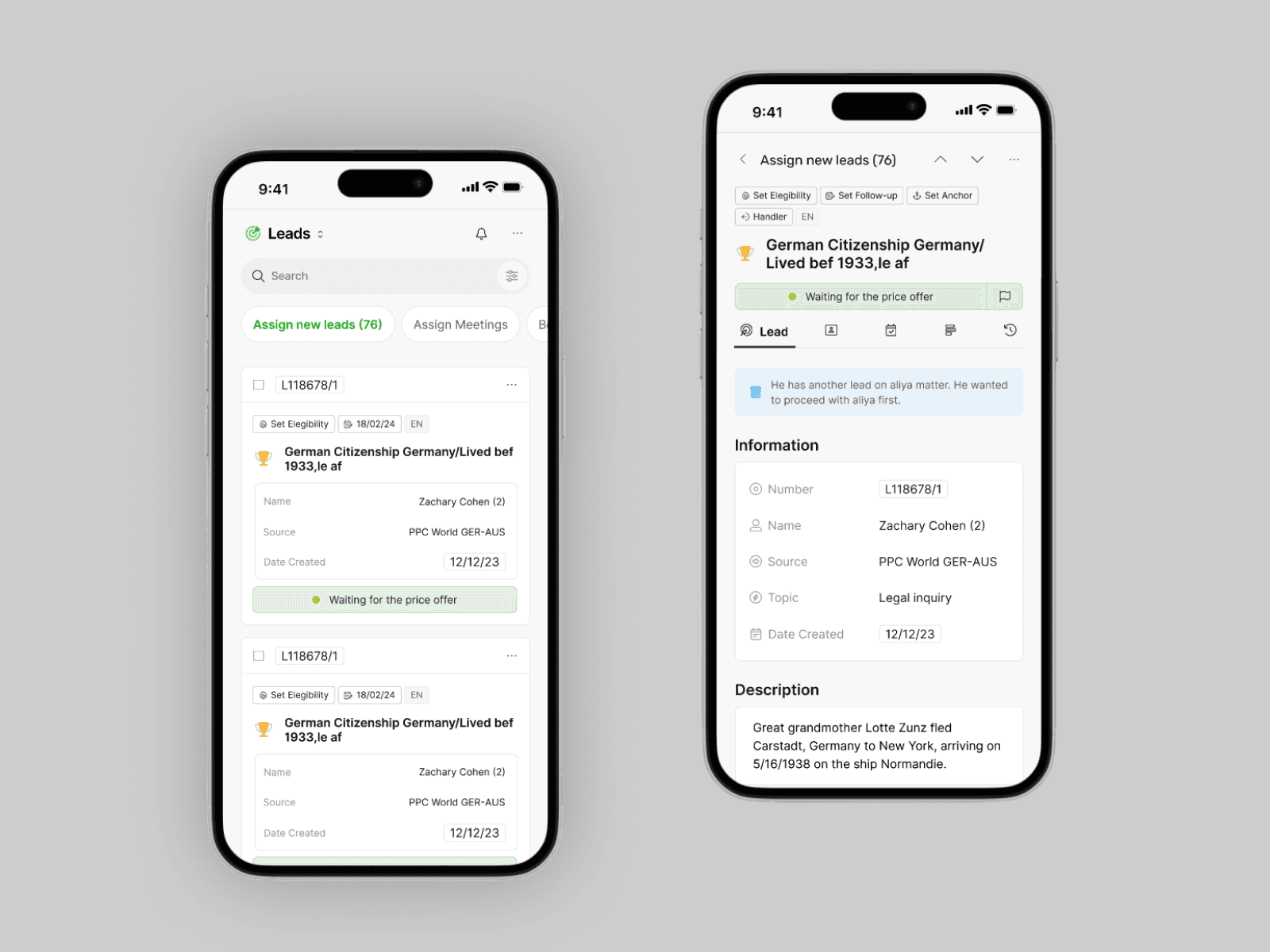
Mobile Experience
Fully functional mobile version with feature parity
Mobile-first design approach
Responsive adaptation of all desktop features
Touch-optimized interactions and gestures
Impact
Client Satisfaction
"This is impressive" — and a green light for commercialization.
The client's reaction was highly positive with complete satisfaction regarding:
Proposed functionality and workflow design
Button placement and navigation logic
Overall system organization and flow
Stakeholder Approval
All key stakeholders expressed satisfaction:
Project manager: Confirmed solution addressed user pain points
Firm owner: Approved for implementation and future commercialization
Developer: Ready to implement with clear documentation
Business Impact
✓ Addressed severe employee dissatisfaction with previous system
✓ Improved quality of work life for daily users
✓ Optimized relationship management with potential clients
✓ Created foundation for future commercial product
Delivery Success
✓ Complete deliverable ready for developer implementation ✓ Project completed within 3-month timeline ✓ Successful complexity management given lack of initial documentation

Key Learning
Good design infrastructure changes how organizations work.
1. Collaboration Without Documentation Requires Strategic Extraction
Working on a complex system without documentation taught me to:
Extract information through extensive testing and observation
Use collaborative questioning with stakeholders effectively
Create comprehensive self-documentation as foundation
Build shared understanding across designer-PM-developer triangle
Key insight: Successful collaboration can overcome lack of formal documentation when communication is prioritized.
2. Prioritize Documentation Before Wireframing
For future projects, I learned to:
Engage directly with developers earlier in the process
Understand technical constraints before design decisions
Document implementation considerations upfront
Create shared technical-design vocabulary
Key insight: Greater programmer collaboration early prevents redesign and ensures feasible solutions.
3. Design Systems Create Organizational Culture
Delivering a complete design system goes beyond solving immediate problems:
Establishes UX culture in daily tools and workflows
Improves employee quality of life long-term
Enhances client relationship management systematically
Creates scalable foundation for future improvements
Key insight: Good design infrastructure transforms how organizations work, not just what they use.
